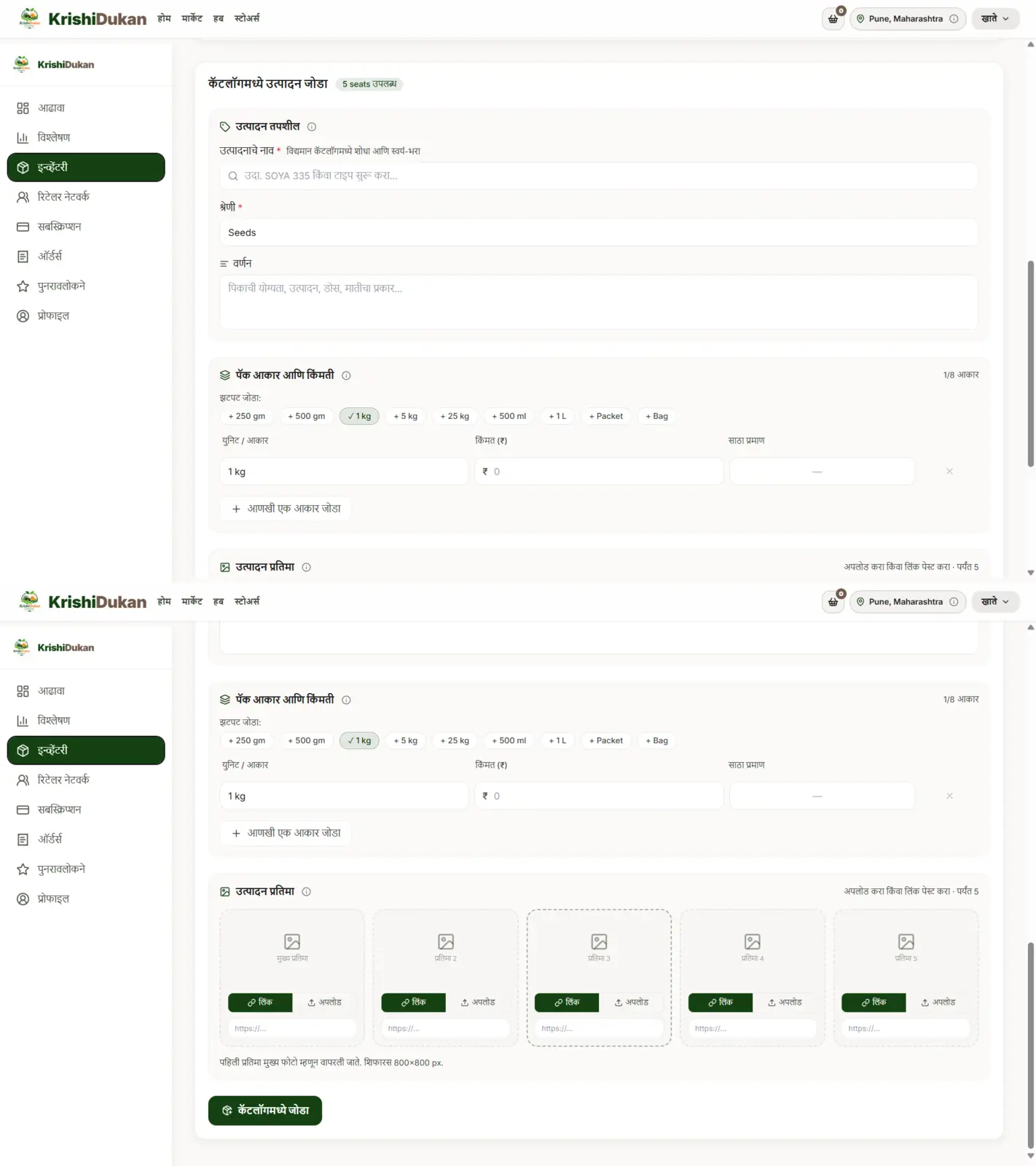
How to add products on KrishiDukan

Step-by-step product creation and publishing.

Step 1 — Product Details

User enters:

  • Product Name
  • Category
  • Description
  • Crop Suitability
  • Quantity

Step 2 — Pack Size & Pricing

Multiple variants supported:

250gm500gm1kg5kgetc.

Each variant has:

  • price
  • stock

Step 3 — Product Images

Supports:

  • upload
  • image link

Maximum: 5 images.

Step 4 — Publish Product

User clicks "Add to Catalogue". Then:

  • product becomes active
  • marketplace listing created
Product creation — details, pack sizes, images and publish.

Ready to list your products?

From ₹21 per product listing per month, plus a 1% platform fee on successful online sales. Payment gateway charges (currently around 2%, levied by the payment service provider) and applicable taxes are additional.